Building a Local App for Transcribing Medical Conversations and Auto-Filling Forms
Context
At the end of last year, I had a call with one of my sisters, a doctor working in a hospital. We were chatting about the progress of AI in medicine when she joked, “I’ll be happy when AI can do the summary of my anamnesis and all the bureaucratic stuff for me.”
That stuck with me. I replied with the classic maker’s phrase: “That can't be so hard to build.” — a phrase often followed by weeks of frustration. But in this case, it actually turned out to be a relatively straightforward project. Around that time, DeepSeek v2.5 just had just been released 1 or 2 days ago — shortly before the big media coverage. To me, it was a huge deal: a strong language model, freely downloadable and usable locally (assuming you had powerful enough hardware — we’re talking several ten thousands in GPU costs). Other essential components were already available: OpenAI’s Whisper for speech recognition, high-quality local TTS systems, and fast translation models. That gave me an idea:
What if I built a fully offline, privacy-preserving app that listens to doctor–patient conversations and automatically fills out medical forms, locally — no cloud, no external storage, no privacy concerns?
This could be particularly useful in hospitals or clinics with strict privacy requirements. My sister also mentioned that doctors often deal with patients who don’t speak the local language, and some colleagues rely on tools like Google Translate — which adds some privacy concern. So, adding real-time, offline translation became part of the plan too.
The Idea
The core concept:
- A local server (inside the hospital’s intranet) hosts all the models via API.
- Doctors access it through a smartphone app or web app.
- Everything is processed and stored locally — nothing ever leaves the premises.
Core Features
- Doctors can start and stop recordings with one tap.
- Real-time translation between doctor and patient, offline.
- Doctors can re-listen to the recorded conversation, to verify translation accuracy or clarify a part of the discussion.
- Admins can define custom forms — for example: general anamnesis, psychiatric history, etc.
- Forms can be external links (e.g., hospital intranet pages).
- AI suggests how to map transcribed content into form fields; admins can tweak rules manually.
- Doctors can regenerate form data for different form templates.
- Form output can be exported as text or PDF — useful for other software, reports, or prescriptions.
- Data is stored locally, and conversation logs can be auto-deleted after export or after a set retention period.
Tech Stack (All Free & Open Source)
Backend:
- Containers: All services run in containers using Podman (an open-source Docker alternative).
- Reverse Proxy: Nginx for simplicity and performance.
- Authentication: Keycloak, an open-source identity and access management tool. It's a full-featured login system and can be reused across internal too.
- API Framework: FastAPI in Python. It supports OpenID, integrates with Keycloak, and auto-generates docs.
- Model Hosting & Logic: Python-based service (with HuggingFace transformers) wraps all models (STT, LLM, TTS, translation). Not the fastest solution, but the easiest one.
Frontend:
- Flutter (Dart) — a fantastic open source framework by Google for building cross-platform apps. It runs on Android, iOS, desktop, and the web from the same codebase.
Implementation
Since I didn’t yet have the hardware needed to run DeepSeek locally, I began with their cloud-based API. From the start, I structured everything for easy migration to a local deployment in the future.
To better simulate on-premise performance, I included a response throttling mechanism, allowing me to test how the system would behave under different token-per-second rates — helping estimate what kind of hardware would be necessary to support real-world usage.
After about 3–4 full days of coding, setup, and container orchestration — and surprisingly, without any major issues — the first prototype was up and running.
I named the app AnamnIA (a blend of Anamnèse and IA — French for AI), designed a simple logo with GIMP, and built a presentation website, which you can find here.


App Structure
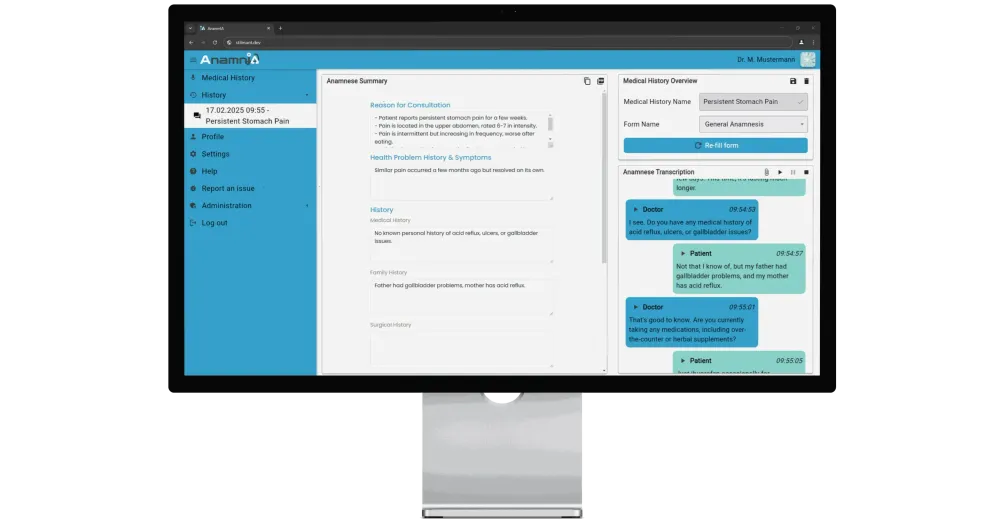
The app features a multi-page interface, with navigation on the left-hand side. Here's an overview of the main pages:
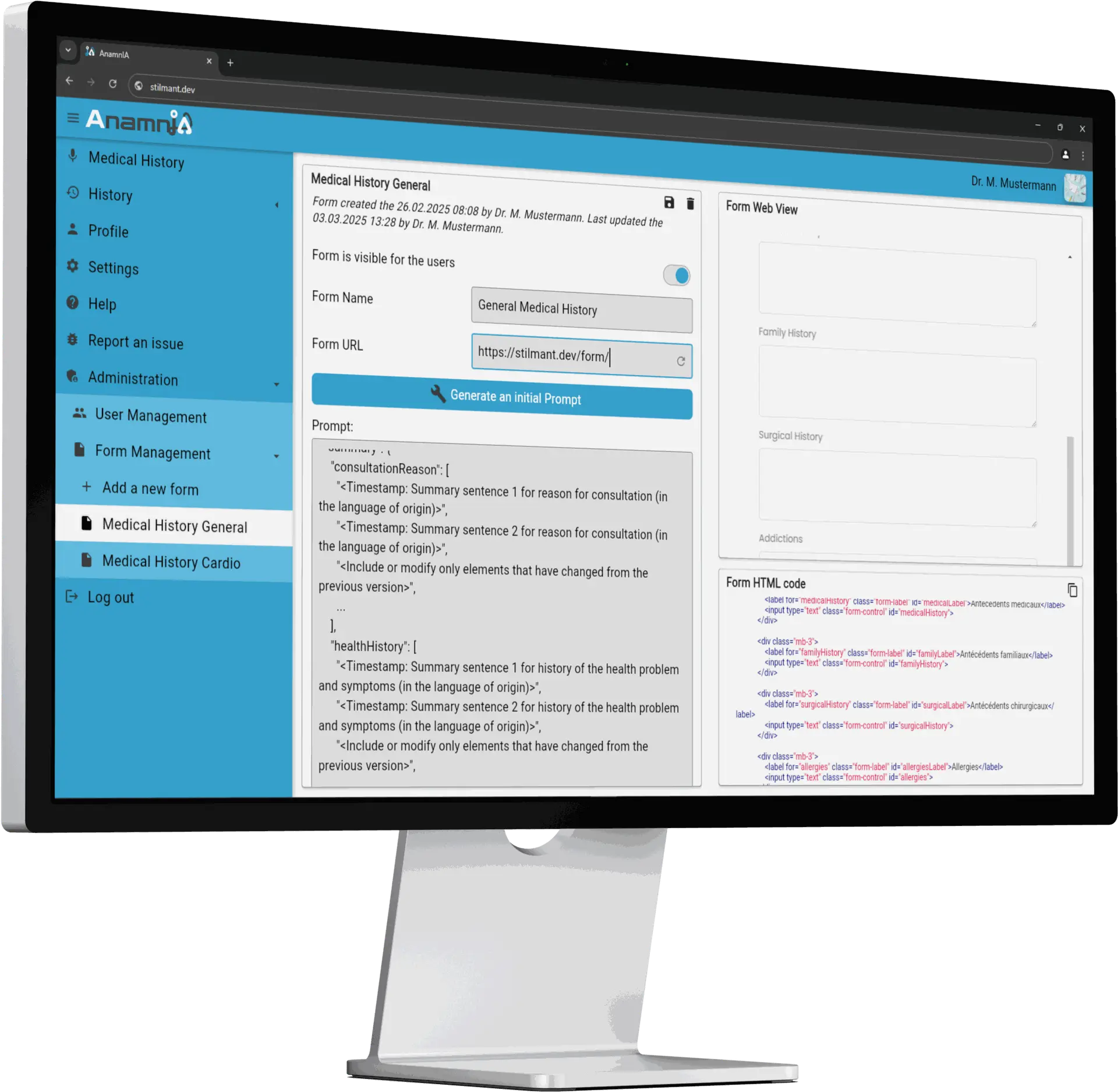
The Form Management Page
Accessible only to users in the admin group (as defined in Keycloak), this page allows admins to:
- Add new forms by providing external links (e.g., a hospital intranet form).
- The app then renders the form in a split view:
- The right side shows the live web form and its parsed HTML structure.
- The left side shows an auto-generated JSON mapping.
This JSON mapping associates each HTML input field with a prompt describing how the LLM should fill it. Admins can modify these mappings to define specific formatting rules or content expectations.
This page is only accessible for admins (the admin group is managed via KeyCloak). In this page, admins can add a link to a new form. The App automatically shows the linked Form in the Form Web View and the html code of the Form on the right side. The App then also generates an initial JSON mapping which maps the html field IDs of the form with a prompt that says how this field must be filled by the LLM. This mapping can then be edited by the admin if they want to add some specificities to how the form must be filled (e.g. some specific sentence formatting or etc.)
Note: The current JSON editing system is still a bit too technical for non-developers. A more user-friendly GUI for this would definitely be required for a better adoption.
Once a form is finalized and enabled, it becomes available for doctors to use in the medical history page.
The Medical History Page
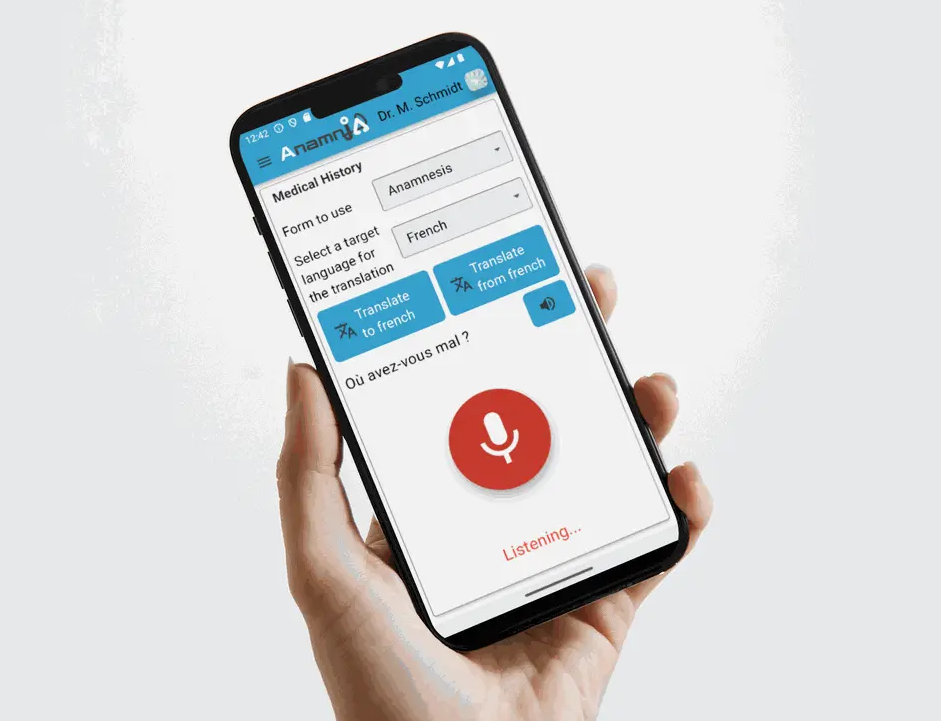
This is the main interaction page during a doctor–patient session. Key features:
- A prominent recording button allows doctors to easily start and stop transcriptions.
- Doctors can select a target language for live translation if needed.
- If communication barriers arise, doctors can trigger “Translate To” or “Translate From” modes:
- They speak a sentence.
- The app transcribes and translates it.
- Output can be shown as text or played via a TTS model.
This enables natural, privacy-respecting communication even across language barriers — without relying on cloud services.
The History Page
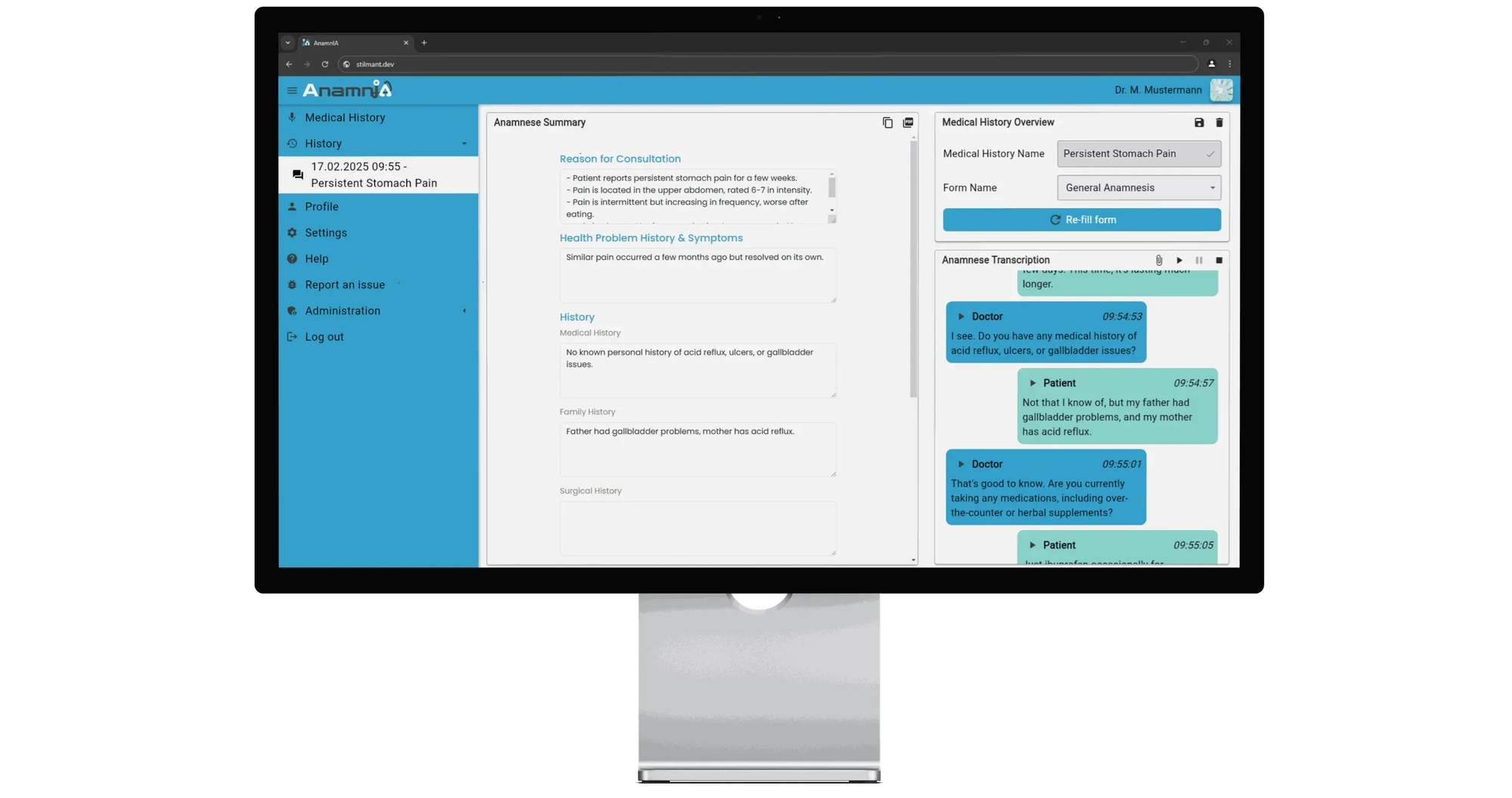
After a session ends, a new entry is saved in the history:
- On the right, a chat-style view displays the full conversation. Each message is attributed to either the doctor or the patient, making it easy to track the dialogue.
- Doctors can replay the full discussion, or replay specific sentences to verify translation accuracy.
- On the left, the form that was automatically filled from the conversation is displayed.
Additional pages
While the three above are the core features, the app includes a few smaller utility pages:
- Profile Page: Update profile image, name, and title.
- Settings Page: Configure UI language, font size, dark/light mode, and other preferences.
- Help & Report Issue Pages: These pages trigger your default email client with pre-filled subjects, making it easy to contact support or report bugs.
Tests and Limitations
To evaluate the app’s performance, I ran a series of tests:
- Used YouTube videos simulating doctor–patient conversations — some with added background noise to stress the transcription system.
- Included speech samples with strong accents to check model robustness.
- Tested across multiple languages — French, German, and English — all of which I speak fluently, so I could manually verify both transcription and translation accuracy.
Overall Results: Good, but…
The app turned out to be surprisingly responsive and accurate. In most cases, it filled forms correctly with little to no need for manual corrections. Transcriptions and translations were fast and high-quality, especially for major languages.
However, as expected, performance depends on:
- The language being processed
- The model size (smaller models are faster, but less accurate)
That said, even lightweight models like Whisper small or medium gave acceptable results in English, French, and German — especially for standard medical dialogues.
Major Limitation: Still Hardware Requirements
The biggest drawback right now is the computational cost of running DeepSeek locally.
Some users reported running it on setups costing around 2,500$, but with a generation speed of only about 4 tokens/second (1 token ≈ 0.75 word). That’s roughly 3 words per second, which is just about the pace of natural speech.
This means a form can be filled in real time, but longer summaries or more complex forms will take minutes to complete — which isn't ideal.
I attempted a workaround: having the model generate outputs progressively, using smaller chunks of the conversation as they happen. But the results were inconsistent:
- Important details sometimes appear later in the conversation, and early predictions miss context.
- DeepSeek has a tendency to repeat or duplicate fields instead of updating earlier ones.
- Overall accuracy was better when feeding the full conversation at once, after the recording ends.
Looking Ahead
Right now, the hardware demands of running a full DeepSeek model make this system financially impractical for smaller hospitals or clinics — unless they already invest heavily in GPU infrastructure.
But this could change.
Potential Optimizations:
- If a smaller open-source LLM with comparable quality emerges, it could dramatically reduce the barrier to adoption to such a local system.
- Since DeepSeek is a Mixture of Experts (MoE) model, one possible optimization would be to prune unused expert modules — like those related to math or finance — to shrink the model and reduce inference load.
That kind of fine-tuning will require careful benchmarking and testing, which I plan to tackle in a future blog post.
Note that for restricted group of users that have and account on my KeyCloak, you can try out the app at https://stilmant.dev/app/